
The Air Gap Problem: Why Most Touch Displays Still Struggle With Serious Plan Review
If you are reviewing 4K plans, BIM models, or digital markups on a large touch display, the distance between the front glass and the actual LCD image matters. That void affects clarity, accuracy, and even how confident your team feels when they put a finger or stylus on the screen.
This blog explains what the air gap is, why it exists, and why Volanti uses direct optical bonding to remove it for plan review and digital jobsite workflows.
What Is the Air Gap?
Inside a typical touch display there are several layers:
The LCD panel that generates the image
One or more touch and protective glass layers on top
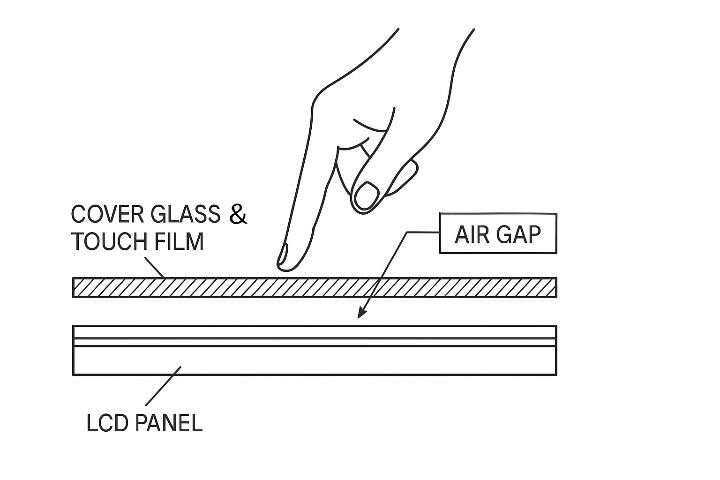
In many touchscreens, there is a thin layer of air between the LCD and the protective glass. That is the air gap.
It might be only 2 or 3 millimeters, but in visual and touch terms it behaves like a much bigger problem:
Light enters the glass, hits the air gap, and reflects back at the viewer.
The image looks like it is sitting “below” the glass, not at the surface.
The pen tip or fingertip appears slightly offset from the pixel you are trying to select.
It is a space for dust.
On a spec sheet, this is invisible. In a jobsite trailer, it is the difference between a display you tolerate and a display you trust.
How the Air Gap Shows Up in Real Products
The air gap is usually a byproduct of how the display is assembled.
Overlay: A Touch Frame on Top of a Monitor
The simplest approach is to drop a framed touch glass in front of a standard monitor:
The original monitor stays intact.
The touch sensor sits in a separate piece of glass or acrylic.
A relatively large gap remains between glass and LCD.
This is common in low-cost retrofits and kiosks, and it creates the largest air gap of all.
Edge Bonding: Glue at the Perimeter Only
A more advanced approach bonds the touch and cover glass to the LCD module around the edges:
Adhesive is applied only on the metal bezel area.
The center area still has air between the LCD and the front glass.
Structurally this is stronger than a loose overlay, but optically it still behaves like an air-gapped stack.
Both methods leave that layer of air in place. That is what Volanti is designing away from.
Why the Air Gap Is Bad for Plan Review
You can think of the air gap as noise in the viewing and interaction experience. For casual content, it is an annoyance. For construction workflows, it creates risk.
Here is how it shows up day to day.
1. More Reflections, Lower Contrast
When light travels from glass to air to glass again, some of it bounces back at each surface. The result:
Higher glare and more mirror-like reflections, especially under overhead lights or near windows.
Reduced perceived contrast, which flattens linework and shading in 4K plans and BIM views.
More eye strain, because the viewer is constantly compensating for washed out details.
Teams often respond by dimming the room or shifting away from the display, which directly undermines the idea of a bright, collaborative digital jobsite.
2. Parallax: The Cursor Does Not Sit Under the Pen Tip
Parallax is the apparent shift in position of the image when viewed through a gap.
With an air gap:
The pen tip is on the top glass.
The pixels are a millimeter or more below.
From a normal viewing angle, the cursor or annotation sits slightly offset from the physical tip.
The impact on workflows:
Users slow down to verify each tap and measurement.
Markups feel less precise, especially near the edges.
People are less confident when placing details, callouts, and symbols.
If you have ever seen someone “hover and correct” with a stylus, tapping twice or three times to get the cursor where they want it, you are watching parallax at work.
3. More Vulnerable to Dust, Moisture, and Flex
Because the front glass is not fully bonded to the panel beneath it, you also see:
Greater risk of internal condensation or dust showing up as haze over time.
More flex when people lean or press on the glass, which feels less solid and can stress the assembly.
A general sense that the surface is “floating,” not part of a single solid structure.
On a jobsite, where people naturally rest hands, elbows, and rolled drawings on the table, this adds up.
Why This Matters More in Construction Than in Office Work
In standard office use, the display is often just a presentation surface for slides and email. In construction, the display becomes a decision surface.
For plan review and digital jobsite use:
Teams are reading PDFs with fine linework and small text.
BIM and VDC coordinators are comparing overlays and clash views that depend on color and contrast.
Field and precon teams are measuring, marking up, and tagging in tools like Bluebeam.
In that context, the air gap:
Slows every interaction by a fraction of a second.
Increases the chance that a line, dimension, or clash is misread.
Makes your expensive software look harder to use than it really is.
This is why Volanti treats the optical stack as part of the workflow, not just a hardware detail.
Removing the Air Gap: From Optical Bonding to Direct Optical Bonding
The way to address the air gap is to remove the air.
Optical Bonding: Filling the Gap
In a standard optical bonding process:
An optically matched material, often silicone, fills the space between the LCD module and the cover glass.
The material cures into a clear, solid layer with a similar refractive index to the glass.
Internal reflections drop, contrast goes up, and parallax is reduced.
This is already a big improvement over overlays and edge bonding.
Direct Optical Bonding: Volanti’s Approach
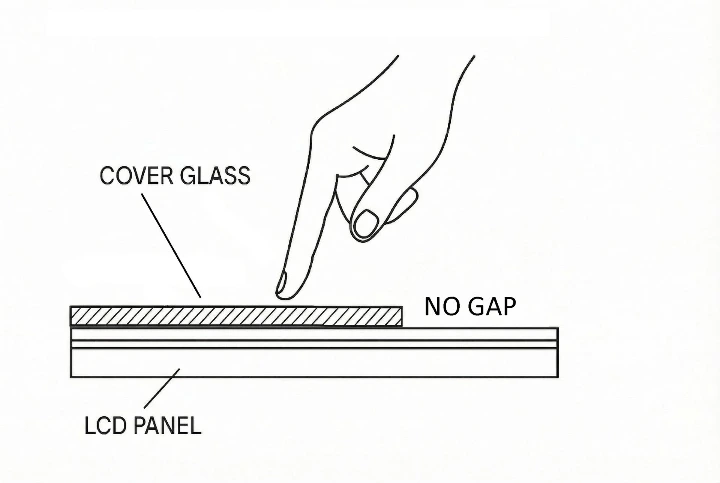
Volanti uses direct optical bonding on its plan review displays:
The bonding material is applied directly to the open-cell LCD glass, not just to the module front.
The touch and cover glass are then bonded with the minimum possible distance to the LCD image.
The glass, bonding layer, and LCD behave as a single, rigid unit.
The practical impact:
The image appears right at the surface, with minimal parallax across the entire screen.
Reflections are significantly reduced, improving clarity in bright rooms.
The front surface feels solid and stable when users write and lean on it.
If you have seen a stylus tracking video on a Volanti direct optically bonded display, that “ink under the pen tip” behavior is what you are seeing.
How to Tell if a Display Has a Problematic Air Gap
You do not need lab equipment to spot an air gap. A simple field test during an evaluation will tell you a lot:
Look at a high detail plan or BIM view in bright light
Do you see your own reflection clearly when you stand in front of the display?
Do small dimensions and hatch patterns lose contrast as you move off axis?
Use a stylus or finger for precise selection
Does the cursor visually sit under the tip, or does it “float” slightly to one side?
Is the offset worse toward the edges of the screen?
Press and lean on the glass surface
Does it flex or feel slightly separate from the image beneath?
Does the image seem to shift as you move your head side to side?
If the answer to any of these is yes, you are looking at the effects of an air gap.
Turning the Display Into a Precision Tool, Not a Commodity Panel
When you remove the air gap with direct optical bonding, the display shifts roles:
It becomes easier to trust the on-screen measurement or markup.
It supports fast, precise Bluebeam and BIM work instead of fighting it.
It holds up better in the physical reality of a trailer or coordination room.
That is why Volanti treats direct optical bonding as a core part of its plan review tables and tabletop displays, not an optional accessory.
If you are standardizing on digital plan workflows, the question is simple: do you want your teams fighting an invisible air gap, or do you want the image and the stylus to live in the same plane?
That choice is made at the bonding stage.
What To Do About the Air Gap
If you want your investment in a plan review display to truly pay off, Volanti’s direct optically bonded 4K plan displays remove the air gap so the image, the glass, and the stylus all live in the same plane.
Learn more here: Direct Optically Bonded Displays from Volanti