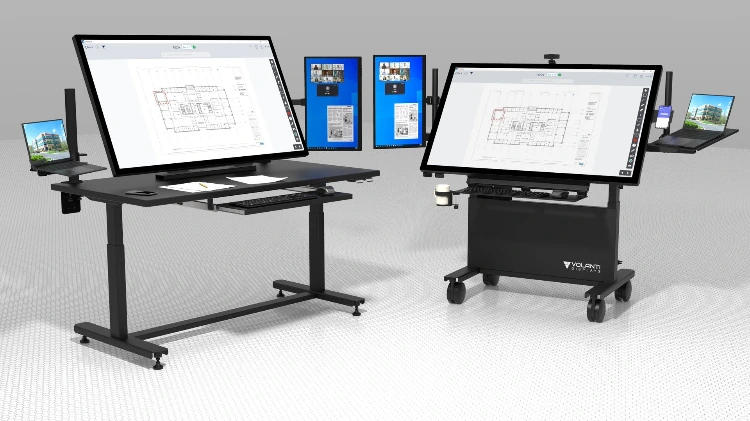
PlanRadar on a 55" Volanti Plan Review Table: From the Jobsite to a Shared Screen
Construction software is increasingly good at getting project information into the hands of people in the field. But there is another part of the process that matters: bringing that information back together so the project team can review it, discuss it, and act on it.
We recently tested PlanRadar on a 55-inch Volanti Plan Review Table to see how the combination works.
The result is a good example of how construction software designed for mobile field use can also benefit from a large shared touchscreen back in the job trailer, project office or coordination room.
What is PlanRadar?
PlanRadar is a construction and real estate management platform built around plans, BIM models and information collected from the field. The company reports more than 200,000 users across 75+ countries.
For construction teams, one of its central ideas is simple: instead of information about an issue sitting in an email, notebook or separate spreadsheet, it can be connected to the location where the issue actually exists.
Users can work from 2D plans, add annotations, create tasks and place information directly on a drawing. Tasks can include comments, photographs, assignees, priorities and deadlines. PlanRadar synchronizes this information so other project participants can see updates as the work progresses.
PlanRadar also includes document management, reporting, plan versioning and plan comparison. For projects using BIM, it supports IFC models and allows tickets to be associated with model geometry.
In practical terms, that means PlanRadar can be used for activities such as:
- Defect and punch-list management
- Site inspections
- Task assignment and follow-up
- Progress documentation
- Plan review and annotations
- Daily logs and reports
- Document and drawing management
- BIM model review
- Handover and closeout documentation
Where the Volanti Plan Table fits
PlanRadar is designed to work across mobile devices and computers. That makes sense in the field: a superintendent, inspector or project engineer needs something they can carry.
The requirement changes when several people need to review the same information.
Opening a drawing on a laptop during a coordination meeting often means that one person controls the computer while everyone else tries to follow along. A conventional conference-room display makes the image larger, but the person operating the software is still sitting behind a keyboard and mouse.
A Volanti Plan Review Table turns the application itself into the shared working surface.
The 55-inch model we used for the test has a 4K, 10-point touchscreen and an adjustable table configuration. It can be connected to a Windows computer or supplied with an integrated mini-PC.
With PlanRadar open on the table, team members can stand around the drawing, navigate around the project and examine issues in their actual plan context.
That is a considerably different experience from passing around a tablet or looking over someone's shoulder at a laptop.
Plans make more sense when you can see the context
A construction drawing contains a lot of information.
On a smaller screen, you can certainly zoom in far enough to read it. The problem is that as you zoom in, you lose the surrounding context.
On a 55-inch 4K display, much more of the sheet remains visible while details are still readable. That is particularly useful with an application such as PlanRadar because its tasks and observations are tied to locations on the drawing.
Instead of looking at a task simply as an item in a list, the team can see where it is, what surrounds it and what else may be affected.
That can be useful during subcontractor coordination, punch-list review, owner meetings and discussions between field and office teams.
From field capture to team review
This is where we think the combination becomes particularly interesting.
The Volanti table is not intended to replace the phone or tablet being carried around the jobsite.
It complements it.
A project team can use PlanRadar's mobile capabilities to record an issue in the field, take photographs, locate it on the drawing and assign responsibility.
Later, the same information can be opened on the Plan Review Table for a project meeting.
The team can then work through the project visually:
- What is still open?
- Where are the outstanding items concentrated?
- What exactly was observed?
- Who has responsibility?
- Has the work been completed?
- Does another trade need to be involved?
Because the information is attached to the project drawings rather than being discussed in isolation, the conversation has much more context.
Reviewing drawing changes
PlanRadar also includes automatic plan versioning and a Plan Compare Viewer that highlights differences between drawing revisions.
This is another function that benefits from screen area.
Drawing changes are easier to understand when the team can see a meaningful portion of the old and new information at the same time, rather than repeatedly zooming and panning around a laptop screen.
For construction teams dealing with revised architectural, structural and MEP drawings throughout a project, being able to put the revision on a shared touchscreen gives everyone in the room the same reference point.
BIM benefits from the larger surface too
PlanRadar isn't limited to 2D drawings. Its openBIM viewer supports IFC files exported from applications including Revit, Archicad, Allplan and Navisworks. Users can navigate the model, inspect model information and connect tickets with model geometry.
A BIM model is another good example of information that becomes difficult to discuss when it is confined to one person's laptop.
Putting the model on a 55-inch touchscreen allows the person leading the discussion to navigate directly around the building while the rest of the team can see what is being discussed.
Not every person standing around the table needs to be a BIM specialist. They can simply look at the building.
Software in the field. A shared screen when the team comes together.
Construction software has made it possible to carry an extraordinary amount of project information onto the jobsite.
The next challenge is making that information easy for people to use together.
PlanRadar provides the project information: plans, BIM models, tasks, photographs, observations, documents and status.
The Volanti Plan Review Table provides a large interactive surface where the team can work with that information together.
For us, that is the value of combining the two.
Capture the information where the work happens. Then give the whole team a clear place to review it.
See PlanRadar running on a 55" Volanti Plan Review Table in the video above.
Interested in seeing your own construction software on a Volanti touchscreen? Book a 15-minute personal demo.
PlanRadar is a third-party software application. Volanti Displays tested PlanRadar on a Volanti 55-inch Plan Review Table. References to PlanRadar do not imply a partnership or endorsement unless otherwise stated.
Next Steps...
- Get a personal online demo of the Volanti Plan Table
- Contact us by phone, 408.500.3500, or use the form below