Volanti PDF Plan Viewer
Touch-first plan app for Windows touchscreens
Plan review, markup and measuring for the job site
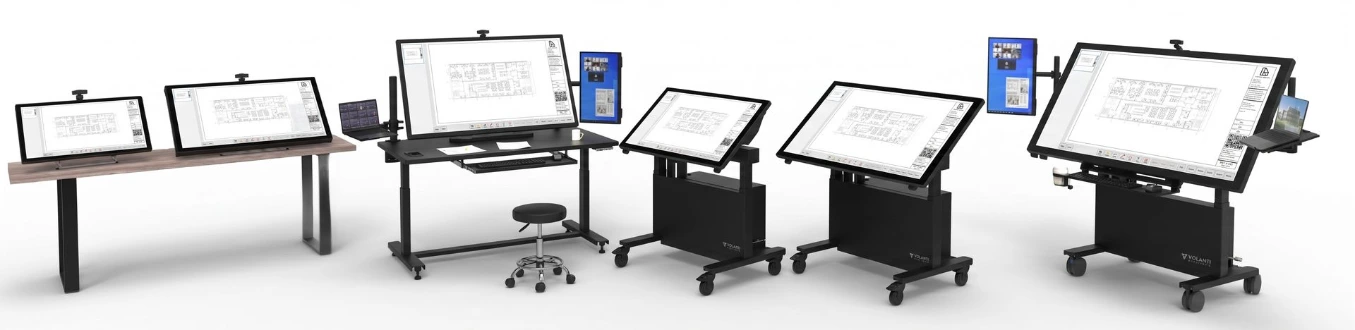
A touch-first Windows app for viewing, marking up, and measuring construction plans, from a touch laptop to a 32, 43, 55, or 65-inch Volanti plan review table or tabletop display. Find any sheet by number or title, mark it up, measure it at scale, and save your markups into the PDF so they go wherever the plan goes.
Download v1.4.68 (new: measuring, sheet search, QR stamp, markups saved in the PDF)
Free on Volanti displays. A 30-day free trial on other Windows touchscreens, then a one-time license with no subscription. Requires Windows 10 or 11.
Every tool.
One strip along the bottom.
Designed for touch.
Every action lives in a single toolbar along the bottom of the screen, built for touch and stylus. Buttons are labeled and size themselves to your display, so they come out about the same physical size on a 32-inch screen and a 65-inch one. Tap an active tool again to open its options. Tap any markup to select it, and double-tap an arrow or text box to change its color, line or text size.

Select
Pick existing marks to move, resize or delete them. You can also just tap a mark.
Highlight
Drag-paint a translucent stripe over text or a region.
Draw
Freeform pen for hand-drawn notes or signatures. Pen / stylus
Arrow
Drag out a directional arrow with an arrowhead.
Cloud
Drag a rectangle to enclose a region in a standard revision cloud.
Text
Tap a spot to type a floating text box.
Sizable
Stamp
Drop an Approved, Reviewed or Signed stamp with your name and the date.
Callout
Tap the detail, then tap where the note goes. A leader line connects them.
QR
Stamp a QR code that opens this file, or any link you choose, with a readable caption underneath.
Measure
Lengths, areas and counts at the sheet's scale. Points snap to the drawing's lines.
Undo / Redo
Step back and forward through every markup change, even across saves.
Ctrl + Z / Y
Fit
Fit the current sheet to the screen. One tap back from any zoom level.
Save · Export
Save puts your markups into the PDF. Export saves a clean copy to send. Ctrl + S
More…
Print, Open With, Save a Copy, Earlier Versions, display settings (dark mode for the app and the sheet, button size), license and feedback.
Sheets
Jump to any sheet by number or title, or filter by discipline.
Ctrl + F
Hide menu
Collapse the toolbar so the plan fills the screen. One tap brings it back.
Find any sheet fast.
Construction sets are organized by sheet number, not page number, and so is Plan Viewer. It reads the sheet numbers and titles your PDF carries, so you can go straight to E-101 Lighting & Power Plan instead of paging through the set.
- Search by sheet number or title as you type.
- Filter by discipline, such as Architectural or Electrical.
- Always see the plan name, revision, current sheet and page count, even while you pan and zoom.
- Scanned set with no sheet names? Name the sheets yourself, and Plan Viewer remembers them.
Measure at the sheet's scale.
Tap Measure for lengths, areas and counts. Plan Viewer reads the scale printed on a full-size sheet and marks it Detected. You can also pick a standard scale, imperial or metric, or set the scale by measuring a known distance on the drawing.
- Points snap to corners, crossings, line ends and curves, with a magnifier under your finger.
- Lengths in feet and inches, decimal feet or meters. Areas in square feet.
- Every measurement keeps its own scale, so one sheet can hold the plan and an enlarged detail.
- Measurements save with your markups, and other PDF programs show their values.
A measurement is only as right as its scale. Half-size and scanned sets no longer match their printed scale, so set the scale from a dimension on the sheet.
Markups that travel with the plan.
Tap Save and your markups go into the PDF itself, as standard PDF markups with your name on them. Email it, upload it or copy it, and anyone who opens it in Bluebeam, Acrobat or any other PDF program sees your markups.
- The drawing is never changed. Plan Viewer adds markups to the end of the file.
- Earlier versions are kept. Every save keeps the version before it inside the PDF, so earlier markups can be restored.
- Safe saves. Each save is written and checked before it replaces the plan, so a crash or dropped connection can't damage it.
- One person marks up at a time. Anyone else who opens the plan is told who has it, and anyone just viewing sees the other person's saves within seconds.
- Your choice. For issued sets that must stay exactly as they are, Plan Viewer can keep markups in a separate file instead.
Three paths to a licensed install
Volanti PDF Plan Viewer is license-code software. Try it for 30 days, buy a key when you're ready, or get it free with any Volanti touchscreen table.
Free 30-day trial
- All features unlocked from day one
- No online activation required
- Works fully offline
- Timer begins on first launch
Activated license
- One-time purchase, no subscription
- Lifetime use of v1.x on one PC
- v1.x updates included
- Works offline about 14 days at a time between license checks
- Re-issue available if the PC changes
Bundled
- Included free with every Volanti table
- Volanti displays are detected automatically
- No trial timer, no activation prompt
- Free upgrades to the latest version
System
Plan Viewer is a native Windows desktop app with a small footprint and no telemetry. Your plans stay on your own PC or network. The app goes online only to check for updates and, on a paid license, to check the license about every 14 days. It runs on the Windows PC that drives your Volanti table, or on any Windows touchscreen.
System Requirements
OS: Windows 10/11 (x64)
Runtime: .NET 8 (installs automatically)
Installer: Code-signed by Volanti Displays Inc.
RAM: 16GB recommended
Input: Touch · Stylus · Mouse · Keyboard shortcuts
Display: Any Windows touchscreen; designed for 4K, up to 65 inches
File Handling
Reads: PDF (single and multi-page)
Markups: Saved in the PDF as standard PDF markups, or in a separate file if you choose
Drawing: Never changed; markups are added to the end of the file
Earlier versions: Kept inside the PDF and restorable
Exports: A clean copy with your current markups
Print: With or without markups
Max page size: ARCH E (36 × 48 in)
Locked PDFs: Read-only or secured files: markups are saved alongside automatically
Connectivity
Trial check: None, offline
Activation: Once, when you enter the key
License check: About every 14 days (paid license)
Hardware unlock: Volanti display
Account or cloud sign-in: None
Updates: Checked automatically, installed when you choose
Telemetry: None
Crash logs: Local file, sent by you
Frequently asked questions
If you have questions that are not answered on this page, please contact us, and we will get back to you asap.
No. The 30-day trial starts the first time Plan Viewer is launched on a PC. There's no sign-up, no email and no online check, and every feature is available throughout the trial.
In the PDF itself, as standard PDF markups, so they travel with the plan and show in Bluebeam, Acrobat or any other PDF program. Plan Viewer adds them to the end of the file and never changes the drawing. Every save keeps the version before it inside the PDF, so you can restore earlier markups from More > Earlier Versions. If an issued set must stay exactly as it is, set Save Settings to keep markups in a separate file instead.
Yes. Tap Measure for lengths, areas and counts. Plan Viewer reads the scale printed on a full-size sheet when it can and marks it Detected. Otherwise, pick a standard scale or measure a known distance on the drawing. Points snap to the drawing's lines. Half-size and scanned sets no longer match their printed scale, so set the scale from a dimension on the sheet.
One person marks up a plan at a time. Anyone else who starts is told who has it, and if they carry on, their markups are saved as a copy. Anyone just viewing the plan sees the other person's saves within seconds.
They show them, but versions before 1.4.61 can't edit markups saved in the PDF, and versions before 1.4.58 drop measurement values when they save. If your team shares plans, update every PC.
No. Plan Viewer detects a connected Volanti display and unlocks automatically, and the trial timer never appears. New versions are offered in the app as soon as they are ready.
Yes. On a Volanti display it works completely offline. A paid license needs an internet connection only at the moment you enter the key. After that, it works offline for about 14 days at a time between license checks, which covers most job-site connectivity gaps.
Yes. Contact support with your key and a brief reason, and they can reset the activation if you've reached the install limit for your key. Each key covers one active install at a time.
The app still opens and reads PDFs, but the markup tools are disabled until a license key is entered. Markups already saved in your PDFs stay in them and show in any PDF program, and you can edit them in Plan Viewer again as soon as you activate.
Get the installer.
Be marking up plans by lunch.
Plan Viewer · Windows 10 / 11 · .NET 8 auto-install
Next version alpha release: TBA