Volanti Control Panel
Another Touch First App for Volanti Touchscreens
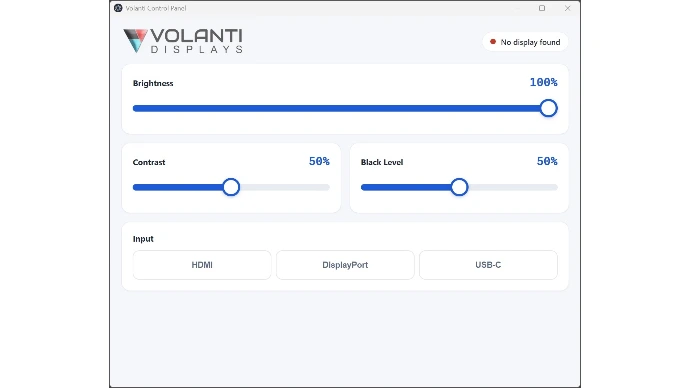
A Touchscreen Control Panel
A touch-first control panel exclusively for Volanti 4K touchscreens. Brightness, Contrast, Black level - more features coming.
Download v2.0.0 (release version)
Free to use on Volanti Displays. Note: This will not work with other displays.
Four controls.
One screen, built for touch.
Three oversized sliders and a row of input buttons, sized for a fingertip or a gloved hand. Nothing is buried in a menu, and there is no on-screen display to navigate with a remote.
Brightness
How much light the panel puts out. Turn it down for a dim room, up for a bright one.
0 – 100, defaults to 100
Contrast
The gap between the lightest and darkest parts of the image. Lifts detail in flat drawings.
0 – 100, defaults to 50
Black Level
How dark the darkest parts are rendered. Useful when shadow detail is being lost.
0 – 100, defaults to 50
Input
Switch the display between sources without reaching for a remote.
HDMI · DisplayPort · USB-C
The paths to a licensed install
Volanti Control Panel is designed exclusively for Volanti touch screen monitors; the command set from the application is not likely to match other displays.
Bundled
- Included free with every Volanti display
- Volanti displays are compatible
- No trial timer, no activation prompt
- Free upgrades to the latest version
System
Control Panel is a Windows desktop app that puts the display’s picture and input settings on the touchscreen itself, so they can be changed by hand rather than through a remote or an on-screen menu.
System Requirements
OS: Windows 10/11 (x64)
Input: Touch · Mouse
Display: Designed for Volanti touchscreens
Frequently asked questions
If you have questions that are not answered on this page, please contact us, and we will get back to you asap.
Yes, if you have a connection from the display to the PC using a USB-C cable.
Nothing is lost. A confirmation appears with a ten-second countdown. Tap Keep to stay on the new source; tap Cancel, or simply let the countdown run out, and the display returns to the source you were on. So if the screen goes blank, do nothing and it comes back.
Yes. Brightness, contrast, black level and input are stored on the display itself, not in Windows, so they survive a power cycle and stay put if you connect a different PC.
No. Control Panel speaks to the controller board fitted to Volanti touchscreens, and the command set will not match a third-party monitor. It is free with every Volanti display, with no licence key and no activation, and it works entirely offline.
Get the installer.
Set your screen in seconds.
Volanti Control Panel · Windows 10 / 11 · free with every Volanti display