Volanti Action Clipper
App for AEC - Clip to Action
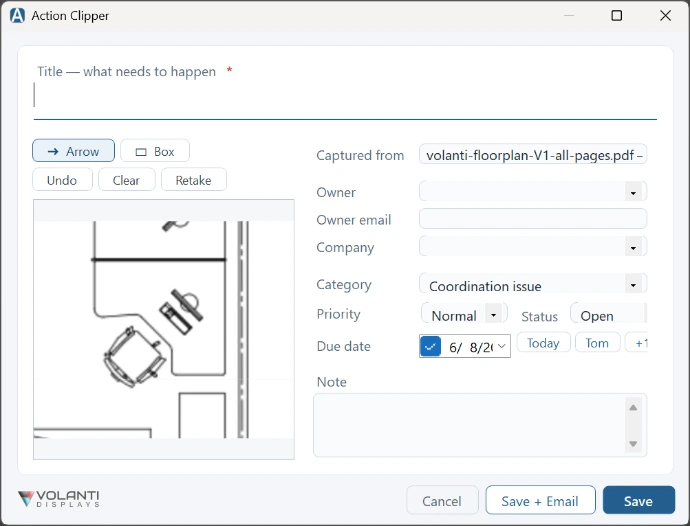
Anything on screen becomes an action with an owner
Snip a drawing, a Procore screen, an email, a photo — give it an owner, a trade, and a due date, and send it on its way. Not another screenshot tool: a screenshot plus a note becomes an accountable project action.
Download v1.0.1 (new product, signed)
Free to use on Volanti Displays, 14-day free trial on other displays, then the option to purchase a license for $19.99
From snip to assigned action.
In under a minute.
Press Ctrl+Shift+A in any application. The screen freezes, you drag over what matters, point at the problem, and file it with construction fields — not into a folder of forgotten screenshots.
Hotkey capture
Ctrl+Shift+A freezes the screen for a clean drag-snip — over plans, Procore, Bluebeam, anything.
Works everywhere
Annotate
Drop an arrow or box to point at the problem. Undo, clear, or retake in one tap.
Arrow / Box
Title
One line: what needs to happen. That's the action, not the caption.
Required
Owner
Assign a person. Owner emails are remembered, and your owner list grows as you use it.
Accountability
Send the marked up capture and text by email.
Save + Email
Company / trade
Tag the sub or supplier responsible, so the register reads like your project actually runs.
Construction-native
CSV export
Drop the whole register into Excel for your own tracking or a meeting agenda.
Excel-friendly
PDF recap
A print-ready report of open actions with their captures — built for the weekly sub meeting.
Meeting-ready
Touch mode
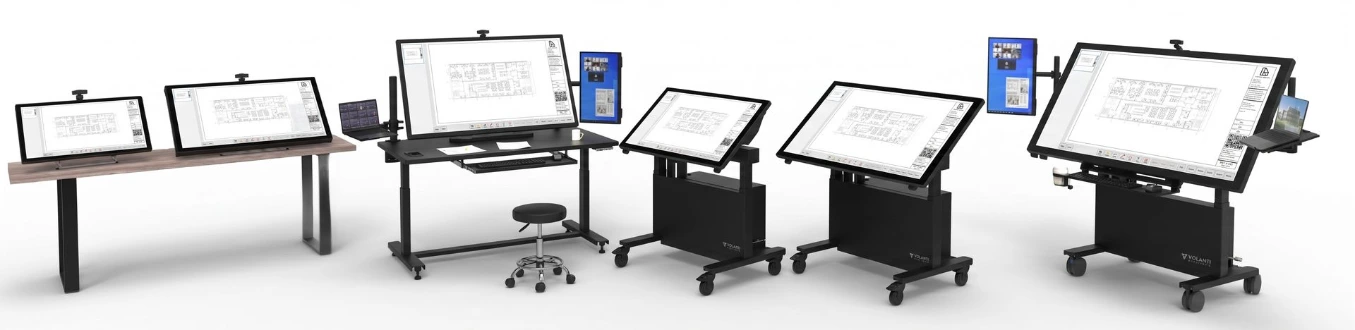
A full-screen, tap-to-pin variant for Volanti touchscreens, launched from a floating button.
Built for the table
Category
Coordination issue, RFI candidate, field correction, quality, safety, schedule, procurement — editable to match your project.
Your vocabulary
Due date & priority
Today / Tomorrow / +1 week quick-set, plus priority and Open / Done status.
Datelined
Action Register
Every capture in one list: search, filter Open / Overdue / Done, sort, edit, mark done.
No lost screenshots
Three paths to a licensed install
Action Clipper is license-code software. Try it free, buy a key when you're ready, or get it unlocked — at no extra cost — with any Volanti display.
Free 14-day trial
- All features unlocked from day one
- No sign-up, no online activation
- Works fully offline on site
- Timer begins on first launch
Activated license
- Lifetime use of v1.x on one PC
- V1.x updates included
- Offline for ~14 days between license checks
- Re-issue available if the PC changes
Bundled
- Included free with every Volanti table
- Volanti displays are detected automatically
- No trial timer, no activation prompt
- Free upgrades to the latest version
System
Plan Viewer is a native Windows tray utility — small footprint, no telemetry, no cloud round-trips. It runs on the same Windows PC that drives your Volanti table, or any standard Windows touchscreen.
System Requirements
OS: Windows 10/11 (x64)
Runtime: .NET 9 (auto-installs)
Input: Touch · Stylus · Mouse
File Handling
Captures: saved as images with each action
Actions: stored locally on your PC
Original screen content: never modified
Backup / restore: one .zip from the tray menu
Uploads to the cloud: never
Connectivity
Trial: fully offline — no account
Activation: once, on entry of key
Email: via your installed Outlook (MAPI)
Telemetry: none — nothing leaves the PC
Frequently asked questions
If you have questions that are not answered on this page, please contact us, and we will get back to you asap.
No. The trial starts the moment Action Clipper is launched for the first time on a PC. There's no sign-up, no email, no online check. Every feature is available throughout the trial.
No — the snip is the start, not the point. Other tools leave you with images in a folder. Action Clipper leaves you with an action that has an owner, a trade, a due date, and a follow-up log, sitting in a register that shows you what's still open and what's overdue.
Anything on screen: a drawing PDF, Procore, Bluebeam, an Outlook email, a photo, the browser. One global hotkey works across your whole workday.
No activation required. Action Clipper detects a connected Volanti display and unlocks automatically. The trial timer never appears. Updates are notified through the app.
Yes. Contact support with your key and a brief reason — they can reset an activation if you've hit the per-key install limit. Each key is good for one active install at a time.
The app continues to open and read PDFs, but markup tools are disabled until a license key is entered. Existing sidecar markup files are preserved and become editable again the moment you activate.
Get the installer.
Capture your first action before the next site walk.
Action Clipper · Windows 10 / 11 · Self-contained installer