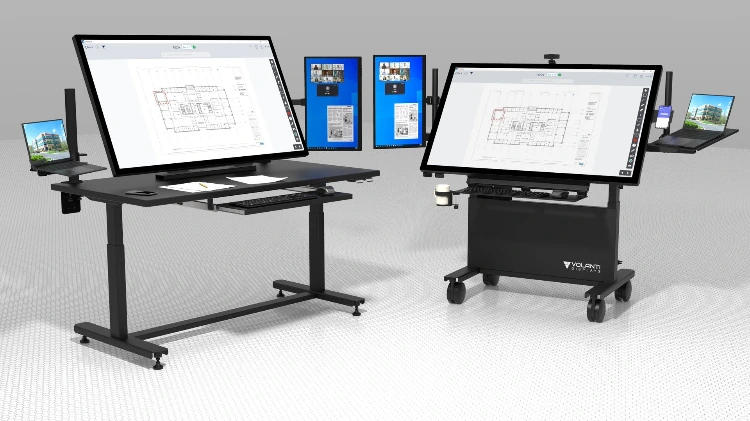
Understanding Digital Twins
A Practical Guide for the Modern Jobsite
Digital Twins are rapidly becoming one of the most impactful technologies in construction. Yet for many teams, the concept still feels abstract: where does a Digital Twin actually live, how is it used day-to-day, and what equipment do you need to take advantage of it?
This article explains Digital Twins in clear, practical terms and positions Volanti’s large-format touch displays as the most effective front-end for interacting with them on the jobsite, in the trailer, and in coordination rooms.
What Is a Digital Twin?
A Digital Twin is a live digital replica of a physical asset, continuously updated with information from design models, field conditions, sensor inputs, and project management systems.
In construction, this often includes:
3D models (BIM)
Real-time field updates
As-built conditions
Asset information (equipment, materials, MEP)
Schedules, sequencing, and inspections
Sensor or IoT feeds (environmental, structural, occupancy)
The value is simple: everyone sees the same, up-to-date representation of the building, reducing errors, speeding decisions, and ensuring the digital workflow matches the physical reality.
Digital Twins Importance on the Jobsite
Digital Twins enable teams to:
Validate design against field conditions
Track progress visually
Improve sequencing and coordination
Catch clashes before they become rework
Support maintenance and O&M handover
Provide owners with a true "digital record" of the building
However, the effectiveness of a Digital Twin depends heavily on how it is accessed.
On a small laptop or tablet, navigation slows, detail is missed, and collaboration suffers.
This is where Volanti’s hardware becomes a crucial part of the workflow.
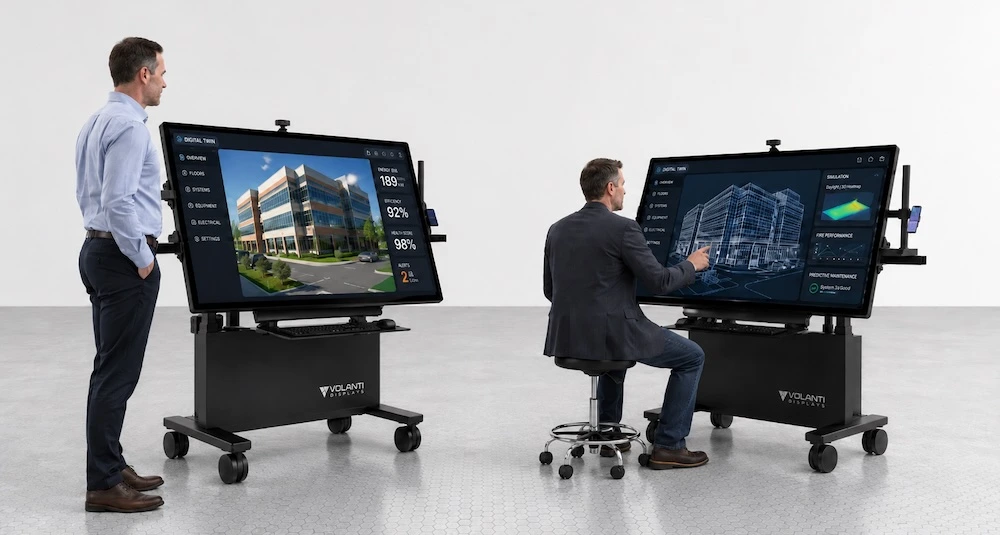
Volanti Displays Enable Digital Twins
Volanti’s large-format, high-resolution touchscreens are designed specifically for plan review, model review, and construction coordination. They solve the practical challenges that Digital Twin users face in the field and in trailer environments.
1. See the Entire Model, Not Just a Slice
Digital Twins demand screen real estate.
A 4K Volanti display allows teams to view complete building systems, layers, and details without excessive zooming or panning. MEP, structural, architectural, and model-linked data can be placed side-by-side, maintaining context while exploring complex areas.
This is essential when using platforms such as Autodesk Construction Cloud, Navisworks Freedom, Revizto, Dalux, or Twinmotion visualizations.
2. Work at Full Scale with Precision
The Volanti tabletop and plan-review displays provide:
True 4K resolution
Industrial-grade touch
Large-format viewing (43 to 65 inches)
Horizontal or angled collaboration surfaces
Rugged, jobsite-ready hardware
This supports precise model navigation and review, something tablets and consumer TVs simply cannot replicate.
3. Collaborative Interaction for Coordination and Reviews
Digital Twins shine when teams gather around a shared model.
Volanti displays are built for this environment:
Multiple people can stand around the table and interact simultaneously
Markups, measurements, annotations, and overlays are visible to everyone
Sessions can be recorded or synced to your cloud platform
For coordination meetings, issue-review sessions, or look-ahead planning, the hardware becomes a shared decision-making hub.
4. Ideal for Linking Digital Twins With the 7-Stage Plan Workflow
Volanti often frames construction workflows through the seven-stage Plan Workflow.
Digital Twins integrate into multiple stages:
Design Development & CDs – validate model completeness
Pre-Construction – run sequencing, logistics, clash detection
Construction – track field changes and compare against the model
Field Revisions – update the twin with as-built conditions
O&M – deliver a complete, searchable digital asset
Volanti displays provide the consistent visual interface needed across all stages.
5. Bringing Digital Twins Into the Trailer and the Field
Most Digital Twin platforms are cloud-based.
Volanti displays function as the physical interface to that cloud.
Use cases include:
Trailer-based coordination rooms
Daily huddles with model context
Inspector walkthroughs
Progress tracking with live model overlays
Material/equipment placement reviews
Safety and site logistics visualization
The Tabletop model is particularly effective because of its portability, ergonomics, and minimal installation requirements.
Practical Examples
Here are common ways construction teams use Digital Twins with Volanti hardware:
Clash and Coordination Review
Switch between disciplines and highlight issues visually in front of the team.
Sequencing and Look-Ahead Planning
Use 4D timeline tools and project the sequence across a full room.
Field Verification
Compare laser scans, drone captures, or photogrammetry against the live model.
O&M Asset Handover
Provide owners with a digital record, navigated on a large display for training, review, and maintenance planning.
Why This Matters for Construction Teams
Digital Twins deliver value only when teams can see them, interact with them, and use them collaboratively.
Volanti displays ensure that:
The model is clear
Navigation is fast
Collaboration is effective
Decisions are better informed
The Digital Twin becomes part of everyday site operations
In other words, Volanti turns the Digital Twin from a concept into a practical tool.
Bringing Digital Twins Into Your Digital Jobsite
Digital Twins are no longer just for large design firms or advanced owners.
They are becoming part of standard jobsite practice, especially as cloud platforms mature and models remain connected from design through construction and facilities management.
Volanti provides the hardware interface that enables Digital Twins to be usable in the real world.
If you want to bring Digital Twins onto your jobsite, into your trailer, or into your coordination workflow, Volanti can help you identify the right display setup and integration paths.